Follow Association for Science Education (ASE)'s board ASE Teaching & Learning Board on Pinterest.
I just wondering about the benefits of using Pinterest to collaborate and share links for organisations. But I suspect that because you have to be a member of Pinterest to see boards these days that it is not useful.
I also don't think that it is practical to search within a pinterest board.
I am after something that can allow us to share links very easily, is collaborative and searchable...
Showing posts with label pinterest. Show all posts
Showing posts with label pinterest. Show all posts
Saturday, 10 January 2015

Wednesday, 28 May 2014
Pinterst Science Teacher
Here is a list of science teachers/educators using Pinterest that I can find. It isn't easy to find your twitter 'friends' on Pinterest, so this might help.
http://www.pinterest.com/drkaiser/
http://www.pinterest.com/agittner/
http://www.pinterest.com/drdav/
http://www.pinterest.com/SecretPhysicist/
http://www.pinterest.com/MissMolecules/
http://www.pinterest.com/dnapolitanocrem/
http://www.pinterest.com/repab/
http://www.pinterest.com/afielder1514/
http://www.pinterest.com/ellie0836/
http://www.pinterest.com/Thomascarlpion/
http://www.pinterest.com/hecharden/
http://www.pinterest.com/tfscientist/
http://www.pinterest.com/smurfatik/
http://www.pinterest.com/neilatkin/
http://www.pinterest.com/specialsciteach/
http://www.pinterest.com/simonpaulwood/
http://www.pinterest.com/alexweatherall/
http://www.pinterest.com/PjSug/
http://www.pinterest.com/davefayecambrid/
http://www.pinterest.com/13loki/
http://www.pinterest.com/neoed23/
http://www.pinterest.com/richpep/
http://www.pinterest.com/graves0363/
http://www.pinterest.com/technologytotea/
http://www.pinterest.com/michellestaubyn/
http://www.pinterest.com/Kookychemist/
http://www.pinterest.com/cdaetwyler/
http://www.pinterest.com/oboelizzy/
http://www.pinterest.com/karennj1/
http://www.pinterest.com/bromleyar/
http://www.pinterest.com/lgolton/
http://www.pinterest.com/debrichmond83/
http://www.pinterest.com/olihandley/
http://www.pinterest.com/yorkscience/
http://www.pinterest.com/ankahal/
http://www.pinterest.com/missldenton/
http://www.pinterest.com/audm/
http://www.pinterest.com/mrssarahep/
http://www.pinterest.com/mrsgriffithsstj/
http://www.pinterest.com/lhoult/
http://www.pinterest.com/lornamonroe/
http://www.pinterest.com/dannynic/
http://www.pinterest.com/myscirn/
http://www.pinterest.com/catmillonline/
http://www.pinterest.com/TheASE/
http://www.pinterest.com/cjgibson85/
http://www.pinterest.com/lightemitting/
http://www.pinterest.com/angek1/
http://www.pinterest.com/aegilopoides/
http://www.pinterest.com/phys1cs/
http://www.pinterest.com/drewthomson/
http://www.pinterest.com/bluemerlycat/
http://www.pinterest.com/mrshlb/
http://www.pinterest.com/KDWScience/
http://www.pinterest.com/fimcgregor/
http://www.pinterest.com/monkeyofscience/
http://www.pinterest.com/drdav/
http://www.pinterest.com/snapshotscience/
http://www.pinterest.com/MrChurch/
http://www.pinterest.com/gregtheseal/
Saturday, 29 December 2012
I have posted previously about pinterest.


I am enjoying using it, although I can find the mobile app a little restrictive and not as functional as using Pinterest in a full web browser.
Getting started (these are mobile app instructions)

Sign up or sign in, depending on whether you have an account already.
When I sign in I am presented with this, or something similar:

If you do not follow anyone this space will be blank.
The menu to help navigate is on the top left. Click it and click search.

I find that connecting to people I am interested in using pinterest is so much more difficult than on twitter, facebook, google+ and tumblr. However, following people is really useful as you can share ideas easily.
The search allows you to find boards, pins and people of interest. By searching by board you can inadvertently find people you might like to follow.

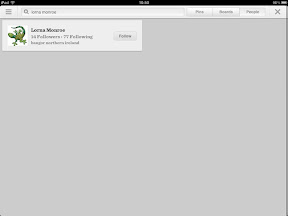
I searched for someone I know, Lorna. She has some great science education related pins.
You can also use the menu to search for education related pins/images.

I often look through these pins. I find them based on primary education, but there is often a gem or two. If I find an image that I like the look of then I can "like" it, "share" it, or "repin" it.

Click on the image you want to repin/like/share and it will increase in size.

I decided to repin this image, so clicked on the repin button.
My images are divided into "boards", usually with the name of the units I teach, but also some more generic ones such as literacy, how science works and funny. I want to pin this image to "literacy" and not "funny".

So I click on the button that allows me to select the board to pin to. A draw pops out and I can scroll to find the appropriate board, or even create a new one.

Before I click on the red button to pin it to my literacy board it is possible to change the notes at the bottom describing the pin.
I am also able to add a comment and see who else has repinned that particular image/pin. These users might be people I would like to follow if they have similar interests. I can also add a comment to the pin.

You do not have to follow all the boards from a particular user. For example discovery education. I am not interested in "arts and crafts" so I only follow the "science board". I don't want my home page to be filled with pins that are not relevant to me.

To upload a pin using the mobile app it is easiest to have the image already saved to your mobile device. Use the menu and select camera. Then choose the image you want to upload, which board to upload it to and add a comment.

I think pinterest has massive potential I helping to share resources and ideas in education.
Happy Pinning!
- Posted using BlogPress from my iPad
I am enjoying using it, although I can find the mobile app a little restrictive and not as functional as using Pinterest in a full web browser.
Getting started (these are mobile app instructions)
Sign up or sign in, depending on whether you have an account already.
When I sign in I am presented with this, or something similar:
If you do not follow anyone this space will be blank.
The menu to help navigate is on the top left. Click it and click search.
I find that connecting to people I am interested in using pinterest is so much more difficult than on twitter, facebook, google+ and tumblr. However, following people is really useful as you can share ideas easily.
The search allows you to find boards, pins and people of interest. By searching by board you can inadvertently find people you might like to follow.
I searched for someone I know, Lorna. She has some great science education related pins.
You can also use the menu to search for education related pins/images.
I often look through these pins. I find them based on primary education, but there is often a gem or two. If I find an image that I like the look of then I can "like" it, "share" it, or "repin" it.
Click on the image you want to repin/like/share and it will increase in size.
I decided to repin this image, so clicked on the repin button.
My images are divided into "boards", usually with the name of the units I teach, but also some more generic ones such as literacy, how science works and funny. I want to pin this image to "literacy" and not "funny".
So I click on the button that allows me to select the board to pin to. A draw pops out and I can scroll to find the appropriate board, or even create a new one.
Before I click on the red button to pin it to my literacy board it is possible to change the notes at the bottom describing the pin.
I am also able to add a comment and see who else has repinned that particular image/pin. These users might be people I would like to follow if they have similar interests. I can also add a comment to the pin.
You do not have to follow all the boards from a particular user. For example discovery education. I am not interested in "arts and crafts" so I only follow the "science board". I don't want my home page to be filled with pins that are not relevant to me.
To upload a pin using the mobile app it is easiest to have the image already saved to your mobile device. Use the menu and select camera. Then choose the image you want to upload, which board to upload it to and add a comment.
I think pinterest has massive potential I helping to share resources and ideas in education.
Happy Pinning!
- Posted using BlogPress from my iPad
Wednesday, 28 November 2012
Pinterest as a teaching tool
I saw an infographic, tweeted by @PookyH, about Pinterest. The link is here: http://www.pookyshares.com/2012/03/the-power-of-pinterest-infographic/
 I like pinterest a lot. I use Delicious for social bookmarking, but I think that Pinterest has more potential. I like the idea of being able to group the images into categories. The organisation in folders means that it is much easier to find the resource.
I plan to use this resource with students so they can find links to help them if they miss lessons or need to recap aspects of topics.
However, to really make the most of pinterest I need to make my own infographics and videos to upload to ensure that all the areas are covered.

I plan to use this resource with students so they can find links to help them if they miss lessons or need to recap aspects of topics.
However, to really make the most of pinterest I need to make my own infographics and videos to upload to ensure that all the areas are covered.
Subscribe to:
Posts (Atom)